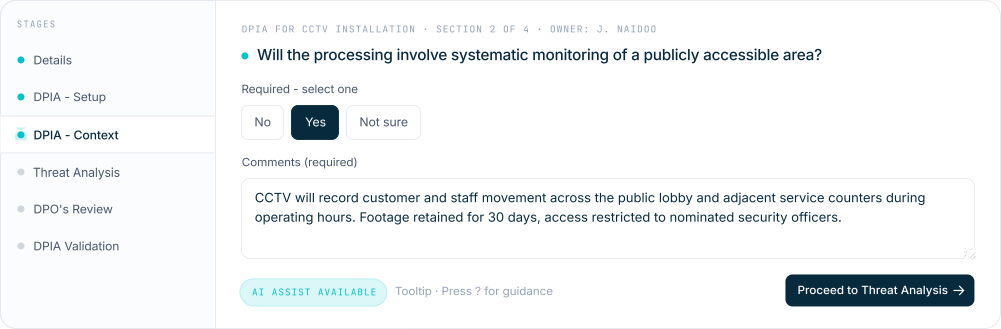
One assessment engine across Data Privacy, AI Governance, Third-Party Risk and GRC. Stages, sections, questions, check lists, threat analysis and 5 by 5 scoring. Roll up into Risk Registers.
Data Privacy Risk Assessments
Statutory assessments, AI use risk and tailored work - all in one place.
The Data Privacy Risk Assessment module ensures compliance with requirements like DPIA and TIA. It also lets you assess and monitor the data privacy practices of third-party vendors and processors against regulatory standards.
Beyond statutory assessments, the module includes AI use risk management. As AI adoption grows, mitigating privacy risk linked to AI technologies matters. A standout feature is the flexibility of AI-assisted, human-verified content: build custom risk assessments tailored to your needs, with the human always accountable for the output.
System templates & custom builds
Configured templates across four modules - plus anything you build.
PrivIQ ships configured System Templates you can copy, rename and translate. Each one carries its own stages, roles, questions, check-lists with risk scoring, and threat analyses. Beyond those, build anything you need – a specific use case, a unique site, a one-off vendor – with or without AI assistance, all in the same engine.
01
Data Privacy
5 system templates
Breach Response & Reporting
System template
Data Protection Assessment (US Generic)
System template
Data Processor Risk Assessment
System template
EU Data Protection Impact Assessment (DPIA)
System template
EU Transfer Impact Assessment
System template
Custom use case
Retailer installing facial recognition CCTV across all stores. Identify previous shoplifters at entry points. Build a full DPIA covering biometric data classification, lawful basis, proportionality, signage and customer transparency, retention windows, vendor processing and DPO sign-off. Draft AI-assisted from a written brief, then human-verified before approval.
AI-assist or manual
02
AI Governance
3 system templates
AI Vendor Due Diligence
System template
AI Governance (Internal)
System template
AI Consultant Due Diligence
System template
Custom use case
Staff have been using an unsanctioned AI tool for weeks. Run a retrospective risk assessment against NIST AI RMF for the specific tool and the data it has seen. Cover data exposure, IP leakage, output reliability, vendor due diligence, the human-oversight gap and remediation tasks. Draft in minutes; sign off in the same workspace.
AI-assist or manual
03
Third-Party Risk Management
7 system templates
Cybersecurity & Information Security Compromise
System template
Data Privacy & Regulatory Non-Compliance
System template
AI System Failure, Bias & Intellectual Property Exposure
Pharma company onboarding a contract research organisation in India. The CRO will process clinical trial patient data. Build a custom TPRM assessment covering data sovereignty, sub-processor disclosure, clinical trial conduct, breach notification SLAs, ethical research controls and sector regulator alignment. Reuse for every new CRO without restarting from scratch.
AI-assist or manual
04
GRC & Operational Risk
Build your own
No fixed templates
GRC and operational risk are user-built. No fixed system templates – the engine is configurable to any framework, any sector, any operational context. Build from a written description with AI assistance, or hand-build stage-by-stage.
Custom use case
Oil company assessing a fuel depot beside a river and a high-density suburb. A safety and environmental risk assessment for the depot location. Cover hydrology and spill modelling, population proximity, emergency response routes, regulator-specific controls (environmental, fire, occupational health) and community engagement. AI-assisted draft from the site brief, then human-verified by HSE leadership before sign-off.
AI-assist or manual
How it flows
From a template to a tracked, reported result.
The same workflow whether you are running a DPIA, an AI vendor due diligence, a TPRM check-list review or a tailored ESG assessment. Owner captures, reviewer reviews, approver decides – and each stage can be assigned to a different person, including an external third party such as a vendor, consultant or auditor. Each stage stamped, each transition notified by email.
01
System Templates
PrivIQ’s curated library of assessments. Copy any template into your workspace.
02
My Templates
Your copies. Edit, rename, translate. Activate when ready to run.
03
Assessments
Run an assessment from any activated template. Track through stages with role-based access.
04
Risk Registers
Roll multiple assessments up into a register with shared appetite and tolerance.
Each assessment is built as a sequence of stages – typically Capture, Threat Analysis, Review, Approval. Each stage runs as a series of sections; each section as a series of required or optional questions, or check lists scored as you capture. Roles dictate who can edit at each stage.
Threat analysis
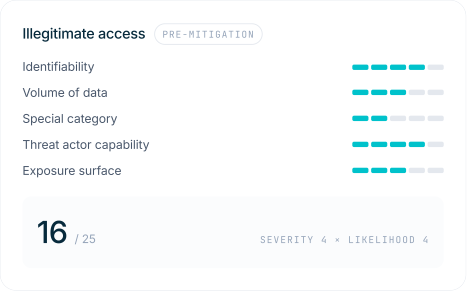
5 by 5 scoring. Pre and post-mitigation, side by side.
For threats inside an assessment, score severity and likelihood from influencer inputs – then again after applying the proposed control. Check lists score the same way at capture – each item flagged for severity, likelihood and mitigated versus unmitigated risk. Monetary risk and cost of control sit alongside, so the value of the control is visible at the moment of the decision.
Build your own
Templates you control. Roles you define.
The template builder lets you add stages, sections and questions, choose input types (radio, multi-select, date, text, file upload), assign which roles can edit at each stage and define possible outcomes. If your account is AI-enabled, generate question sets and threats from a written description – then verify, edit and activate.
A
Owner. Reviewer. Approver. Anyone.
Default role triad – or rename for context. “DPO” instead of “Reviewer” on a DPIA, “Risk Committee” instead of “Approver” on a TPRM tier-one assessment. Each stage can be assigned to a different person, including an external third party – vendor, consultant or auditor – so the right hands are on each step.
B
Input types & check lists
Radio, single-select, multi-select, text, date (any / past / future), file upload, threat analysis block – plus check lists scored as captured for severity, likelihood, mitigated and unmitigated risk.
C
AI-assisted, human-verified
Generate suggested questions and threats from a written description. Edit, verify, accept. The human is always accountable for the output.
D
Activate. De-activate. Re-version.
Activated templates become available under Assessments. De-activate to edit – mindful that someone could still be running the prior version.
Reports & Risk Registers
Scores roll up. Threat to assessment. Assessment to register.
Every check list item, every pre-mitigation threat score, every post-mitigation threat score rolls up into the parent assessment. Assessment scores in turn roll up into the Risk Register as a single consolidated view – programme-level appetite, tolerance and unacceptable thresholds visible at a glance.
Inputs
Check lists & threats
Each check list item scored for severity, likelihood, mitigated and unmitigated risk. Each threat scored pre and post-mitigation on the 5×5.
Rolls up to
Assessment score
Threat scores and check list scores roll into the parent assessment’s pre and post-mitigation totals. Audit trail per stage.
Rolls up to
Risk Register
Multiple assessments grouped into a register. Consolidated programme score with shared appetite, tolerance and unacceptable thresholds.
Output
Dashboard & PDF
Risk Register dashboard for the live view. Download the full assessment or register as PDF or CSV at any point.
Per threat & check list
Score, monetary risk, cost of control.
Severity and likelihood from influencer inputs – pre and post-mitigation. Monetary risk and cost of control side-by-side – the value of the control is visible at the point of decision.
Per assessment
5 by 5 matrix and full audit trail.
Pre and post-mitigation totals plotted on the 5×5 matrix. Every stage transition stamped with user, date and comments. Reopen and reassess at any time.
Per register
Consolidated programme score.
Group assessments into a register with shared appetite, tolerance and unacceptable thresholds. See where the consolidated score sits against tolerance at a glance.
See Risk Assessments running against your real use cases.
Book a walkthrough and we will run a System Template against one of your assessments live.